For Canadian contractors, from site to preconstruction

Your subtrade list, built from your team's Outlook.

Need the electrical subtrade's project manager before tomorrow's pour, or a bid invitation bounced because the estimator moved firms? Their details are probably already in someone's inbox.

Every subtrade, supplier and consultant who has ever emailed your team, in one list, without anyone typing a contact in again. Each scan brings it up to date, and the whole list exports to Excel or CSV for a bidders list, a bid invitation or a project directory.

20 minutes: how you keep your subtrade list today, then a look at a sample contractor's list. No slides.

Working in the UK? See Sigbot for UK contractors

Click around a sample subtrade list, no sign-up →

See it on a sample contractor's list.

A bounced invitation, the signature that fixes it, the review queue, then a bid list by trade and area that goes out to Excel. Under a minute and a half, with captions. It's recorded on our sample UK contractor's list: the company and every contact in it are invented, and the product is the same in Canada.


Your subtrade list is in everyone's inbox.
Not in one place.

Every bid and every job brings new subtrades, suppliers and consultants. Their details are in the signatures of the emails they send, and almost none of them make it into a list.

Nobody has time to type contacts in

Superintendents are running sites, project managers are chasing change orders and estimators are pricing the next job. Nobody is copying phone numbers out of signatures, so the list never gets built.

What does get typed goes stale

People move firms. Numbers change. A list someone put together 18 months ago is half wrong by the next bid.

When you need it, you need it now

A project comes out to bid and the invitations go out today, or a subtrade's foreman isn't answering and the crane is booked. Searching five inboxes for the right person at the right firm costs hours you don't have.

People leave, and their contacts go with them

A good superintendent's or estimator's network lives in their mailbox. When they move on, the firm loses it unless it was captured somewhere shared.


One list for the whole team.
From site to preconstruction.

Everyone on a construction team emails subtrades, suppliers and consultants. Sigbot puts all of those contacts in one shared list, so whoever needs a number can find it.

Superintendents and foremen

The subtrade's foreman, the scaffolding crew, the crane rental company: every number on your phone in the iPhone app, even if they only ever emailed someone in the office.

Project managers and coordinators

Everyone on the job in one list, from the mechanical and electrical trade partners to the structural engineer, with current numbers and an Excel or CSV export whenever you need one.

Preconstruction and estimating

Give every subtrade their MasterFormat divisions, then build the bidders list for a package by division and area from every subtrade who has bid to anyone on your team. Export it to Excel for the bid invitation, or email it from Outlook.

Contract administration and cost control

The right person at each subtrade for progress draws, change orders and closeout, with their current title and company after each scan.

Purchasing and procurement

Every supplier and subtrade who has priced work for you, with the people to call there, kept up to date as reps move on.

Owners, VPs and business development

The firm's whole network of consultants, clients and trade partners in one list, and it stays with the firm when people leave.


Signature in. Contact out.

Sigbot reads the signature at the bottom of each email in Outlook and turns it into a contact. Nobody types anything in. After the first scan, Sigbot checks for new mail by itself every day on paid plans (weekly on Free), and only reads mail it hasn't seen.

01
An email arrives
A subtrade, supplier or consultant emails someone on your team. Sigbot finds the signature block.
02
The signature becomes a contact
Name, job title, company, phone, email and address go into the right fields. No copy and paste.
03
It lands in your list, ready to export
One record per person, in the list and in the Excel or CSV export. Newsletters and no-reply mail go to a review queue instead.
04
Each scan brings it up to date
When someone at a subtrade moves firms and emails you again, your next scan updates the record. If two records are merged by mistake, the merge can be undone.
Incoming email
From: Harriet Okafor <h.okafor@lakeshoreelec.example>
To: You
Subject: Re: Division 26 bid — Riverside Phase 2, Toronto
Hi Sam, please find our revised pricing attached, alternates included. Happy to walk you through it. Thanks,
Harriet Okafor
Project Manager · Lakeshore Electrical
+1 416 555-0147
h.okafor@lakeshoreelec.example
Unit 4, 120 Industrial Rd, Toronto, ON
Signature block found
Reading the signature
Harriet Okafor
Project Manager · Lakeshore Electrical
+1 416 555-0147
h.okafor@lakeshoreelec.example
👤NameHarriet Okafor✓
💼TitleProject Manager✓
🏗️CompanyLakeshore Electrical✓
📞Phone+1 416 555-0147✓
📍LocationToronto, ON✓
In your list
Contacts
Excel or CSV export
HO
Harriet Okafor
Project Manager · Lakeshore Electrical
NEW
Review queue
Held back, not added
TS
Trade Supplies Weekly
Newsletter · no-reply sender
REVIEW
Updated on the next scan
From: Harriet Okafor <h.okafor@arclightmech.example>
Hi, just to let you know I've moved to Arclight Mechanical. Same cell, new company.
Harriet Okafor
Senior Project Manager · Arclight Mechanical
+1 416 555-0147
Record updated
Company: Lakeshore Electrical → Arclight Mechanical
Title: Project Manager → Senior Project Manager

Build a bid list for any package.

Pick the division and the area, select the subtrades and send the bid invitation from Outlook. Addresses that have bounced are flagged, so an invitation doesn't go to someone who has left.

01

Every subtrade has a division

Sigbot has a built-in Trade field. Start from the MasterFormat divisions (03 Concrete, 23 HVAC, 26 Electrical and the rest), give each subtrade their divisions, then filter the list by division and by distance from a city or address, in km or miles. Every 26 Electrical subtrade within 50 km of Calgary is one filter.

sigbot.app/contacts
Sigbot's contacts list on the sample UK contractor's list, filtered to the Electrical trade within 50 miles of Leeds, with a Trade column showing each subcontractor's trades
02

Copy emails or Email in Outlook

Select the subtrades for the package, then copy their addresses to paste into Bcc, or open a new email in Outlook with them already in Bcc.

sigbot.app/contacts
Subcontractors selected in Sigbot on the sample UK contractor's list, with the Copy emails and Email in Outlook buttons and a message confirming the addresses were copied with one bounced address left out
03

Bounces flagged, nothing deleted

When an email to a subtrade bounces, Sigbot spots the delivery-failure notice in Outlook and flags the address. Bounced addresses are left out of Copy emails and exports unless you ask for them, and nothing is deleted automatically.

sigbot.app/contacts
A subcontractor's contact card in Sigbot, on the sample UK contractor's list, with a red Bounced flag and a note saying when mail to the address bounced and that exports leave it out

These screens are from our sample UK contractor's list. When a Canadian account sets up trades, Sigbot puts the MasterFormat divisions first.


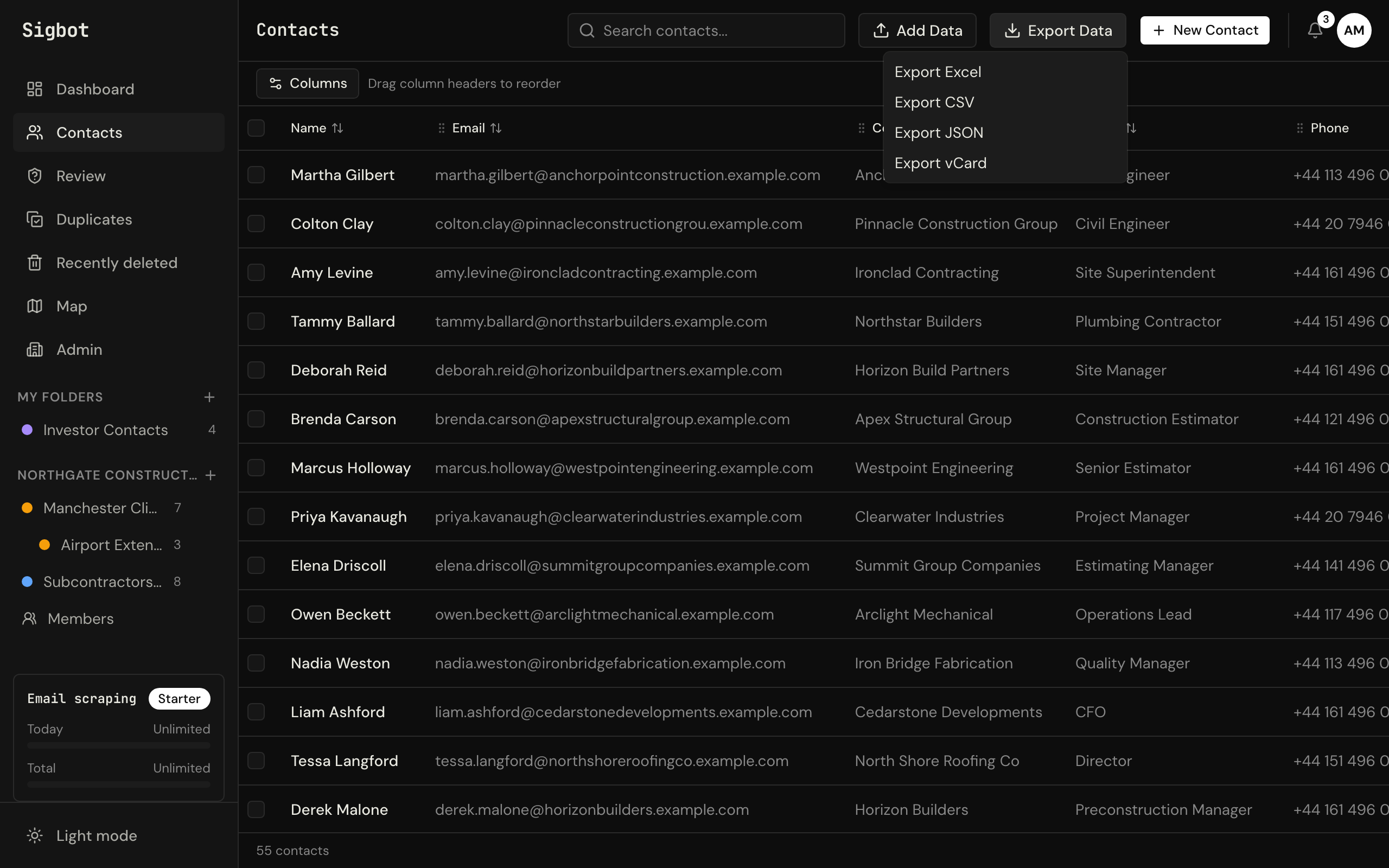
The whole list in Excel or CSV.

Export every contact whenever you need it: for a bidders list, a project directory, or to load into the system you already use. It's your data, in a file you can open.

sigbot.app/contacts
The Sigbot contacts table with the Export Data menu open, offering Excel and CSV downloads

Two ways to start.

Try it on one mailbox, or run a 60-day pilot with your team. Either way you see your own subtrades and suppliers in the list, not a demo.

One mailbox

Inbox History Build

$249 one mailbox, one-off

Start with one person's mailbox, say a superintendent's or the chief estimator's. You need a free Sigbot account and nothing else.

We scan one Outlook or Microsoft 365 mailbox end to end and hand you a clean, deduplicated contact list — live in your account and as an Excel or CSV file — with 30 days of Individual from delivery.

Starts the moment you pay. Most mailboxes are delivered within 3 working days; above 50,000 emails we'll agree a date with you.

Refund terms

Your team, 60 days

60-day Paid Pilot

$1,250 50% now, 50% at day 30

For teams of up to 15 trying Sigbot before an annual plan.

Starter for your team for 60 days, the Team Database Build in the first week, and a weekly 20-minute check-in.

Nothing to pay until we’ve agreed the scope on a 20-minute call. The pilot runs 60 days from the first payment. The full $1,250 is credited against a Starter or Professional annual plan signed within 30 days of the pilot ending.

Or apply for a pilot in the app · Refund terms

Paddle, our merchant of record, takes the payment and handles any tax; in Canada, it's added at checkout. More options: all done-for-you builds and plans and pricing.


What a 60-day pilot proves.

Sigbot is new, so there are no customer logos on this page, and we won't invent any. Instead, before a pilot starts we write down what it has to prove, and you judge it against that.

It passes if, by day 60:

  1. Every mailbox you pick is built in. Site, project management, procurement and estimating: each one connected and scanned into one shared list, in the first week.
  2. The list is used on live work. The bidders list for your next bid (or at least one package of it), or the contact list for a live site, comes out of Sigbot.
  3. The contacts you check are right. You spot-check people you know, and newsletters and no-reply senders stayed out of the list.

We agree the exact criteria with you on the first call. If it passes, the pilot fee is credited in full to an annual plan (terms on the pilot card above). If it doesn't, you don't buy a plan, and you still have the Excel export of your list from the build. The fee is paid in two halves, and if these three points aren't met by day 30, we cancel the second half.

Founding contractors

We're taking on a small number of early teams as founding contractors: a reduced pilot fee in return for honest feedback, good and bad. Ask about it on the call.

How accurate is it?

On September 6, 2026, we ran Sigbot's signature reader over a synthetic test set: 5,000 generated emails with known answers, not customer mail. It found the signature in all 5,000 and read the person's full name correctly in 97.6% of them.

Synthetic test set, measured September 6, 2026. Real inboxes are messier; anything Sigbot isn't sure about goes to the review queue, not your list.


Getting started with a team.

Send us your current subtrade list as an Excel or CSV file and we'll import it into your Sigbot account free, by the next business day. Then your first week looks like this.

  1. Day 1

    Send us your list

    Email the spreadsheet you use today to support@sigbot.co. We load it into your account and tell you if any column can't come across.

  2. Days 1–2

    Connect Outlook

    Each person connects their own mailbox and runs a scan. If Microsoft asks for an admin, hand it to IT: it's a one-off.

  3. Days 3–4

    Clean it up

    Work through the review queue and the suggested duplicates, give each subtrade their divisions, and file contacts into folders if you want them.

  4. Day 5

    Use it on live work

    Filter by division and area to pick the subtrades for one package, say 03 Concrete within 50 km of Vancouver, then email that bid list from Outlook or export it to Excel for the bid invitation. Or give a site team the contact list for their job.

The free import loads the spreadsheet you already have. A paid build goes further: the Team Database Build, included in the pilot, scans every mailbox on your team, triages what it finds and files contacts into folders by project and trade.


What your IT team will ask.

Short answers here. The full detail is in our one-page brief for IT, security overview and data processing agreement.

Access

Read-only access to Outlook

Each person connects their own mailbox by signing in with Microsoft. Sigbot asks to read mail (Mail.Read), not to send, move or delete it, and keeps the contact details from signatures, not the emails.

Approval

Approve once, revoke any time

About two minutes in Microsoft Entra: an admin opens one link and approves Sigbot for the whole company, and can switch it off or remove it there later. Approving it doesn't let Sigbot read anyone's mail; each person still connects their own.

Company

UK company, data in the EU

Sigbot Ltd is registered in England and Wales and with the ICO, the UK's data protection regulator (registration ZC202535). Your data is stored in the EU. Every team plan keeps a year of audit log with CSV export; single sign-on and SCIM are on the Enterprise plan.

Hand it to IT

Send this to your IT person or IT provider. The brief it links to has the approval link and how to revoke it. Questions from IT go to security@sigbot.co; we reply within one working day.

Subject: Can you approve Sigbot in Microsoft 365?

Hi,

We'd like to use Sigbot to build our subtrade and supplier list from the email signatures in our Outlook mailboxes. Microsoft asks for an admin to approve it once for the company before we can connect.

What it asks for: read-only, delegated access (Mail.Read, User.Read, offline_access). Each person connects their own mailbox, and approving it doesn't let Sigbot read anyone else's mail. It can be switched off or removed in Microsoft Entra at any time.

The one-page brief for IT, with the approval link and how to revoke it:
https://sigbot.co/it-admins.html

If you'd rather talk it through, you can book a 20-minute call with Sigbot:
https://sigbot.co/book.html?topic=team

Thanks

In the office and on site.

The same list in the web app at your desk and in the iPhone app on site, so the site team has the numbers the office has. Android once Google approves it.

See it on a contractor's list.

20 minutes: how you keep your subtrade list today, then a look at a sample contractor's list in Sigbot. No slides, and nothing for your IT to approve first.

Who you'll talk to Alex Gooch, founder of Sigbot Runs every call and pilot himself. There's no sales team.

Rather pick a time straight away? Open the calendar. Or click around a sample subtrade list first, no sign-up.

Keeping a list by hand? Get our free subcontractor database template (Excel and CSV).